Updated July 2026: this post originally told most founders to pick Claude Code. Boris Cherny’s steps-of-AI-adoption table changed my perspective: Cowork is the right choice for the majority of knowledge workers. The post now argues the updated version.
Half the founders I talk to use Cowork and love it. The other half keep hearing about Claude Code and wondering if they’re missing something.
Same question keeps coming up: is Claude Code just the technical version of Cowork?
No. In fact, Cowork runs Claude Code under the hood, wrapped in a UI.
The real difference is how many agents you’ll eventually want to run. For most knowledge workers the answer is one, and Cowork is the best one-agent setup there is. Claude Code is for when one stops being enough.
The four steps
Boris Cherny (the creator of Claude Code) published a table in July mapping the steps of AI adoption. He wrote it for engineering teams, but it fits knowledge work just as well. Each step is defined by how many agents you run and what your job becomes:
- Assisted (~1 agent). You and an agent working as a pair, one task at a time. You review almost everything before it lands
- Parallel (~10). You orchestrate 5–10 agents at once (each in its own workspace) and review finished work rather than watching it happen
- Supervised autonomy (~100). Agents manage agents. Boris calls the role ‘manager of managers’
- AI-native (~1,000+). Most agents are kicked off by other agents. You steer by intent and monitor by exception
Cowork appears in Boris’s own product list at step 1. Step 1 is where most knowledge workers should be: an assistant working one task at a time while you review as you go. Every step above it trades simplicity for throughput, and each demands discipline the step below didn’t need: verification you trust and review that keeps up.
So the comparison isn’t which tool is better. It’s which step you want to reach.
What Cowork does
Cowork runs Claude inside a sandboxed virtual computer. It can write output to folders you share with it, but otherwise stays isolated from the rest of your system.
It breaks work into parallel sub-tasks, connects to Google Drive, Gmail, Calendar and Slack, and comes with pre-built skills for common workflows. Project-level instructions persist between sessions. It’s a genuinely good personal assistant – step 1 done properly.
If one great assistant is all you want, you can stop here – Cowork is the right call. The rest of this post is about what going further takes.
What Claude Code adds
Claude Code runs directly on your machine. Everything that takes you past step 1 follows from that choice.
You can run many sessions in parallel. Cowork’s single-chat UI leans toward one task at a time. Claude Code lets you kick off a task in one terminal, immediately start another, then another – I typically run 5–10 at once. When one finishes, I exit and launch a new session with a new task. That’s step 2: you stop watching work happen and start reviewing what comes back.
You can give Claude a specific identity. Claude Code lets you replace the default system prompt entirely. Build an executive assistant with your operating principles, a strategist with a particular tone, or a copywriter with your brand voice baked in. Cowork has its own knowledge-work system prompt you can’t replace. Folder instructions only add context on top.
You can wire your own agents together. Both Cowork and Claude Code read a CLAUDE.md file at the start of every session: your business context, your conventions, a map to everything else. (It’s actually one of five layers of context management happening behind the scenes.) Both run skills on top of that context.
The difference is what you can build with the skills. Claude Code lets you define custom sub-agents – each with its own system prompt, its own tools, its own persistent memory. A skill can delegate to one of them and come back with a summary. You can also configure ‘hooks’ that trigger automatically at specific points: auto-format documents after every edit, block risky commands before they run, or check the agent’s work before a session ends. Cowork has skills and folder instructions but no custom sub-agents and no hooks – compound workflows are possible, just harder to build, and they don’t go as deep.
What this looks like in practice
I have a command called /new-prospect. I type it with a company name and an email address. Claude runs our entire first-mile sales process:
- Searches Gmail for prior history with that contact
- Scrapes and researches the company website
- Scores them against our qualification scorecard
- Creates the prospect folder and account strategy from a template
- Prepares discovery questions based on the engagement type
- After the call, drafts the follow-up email
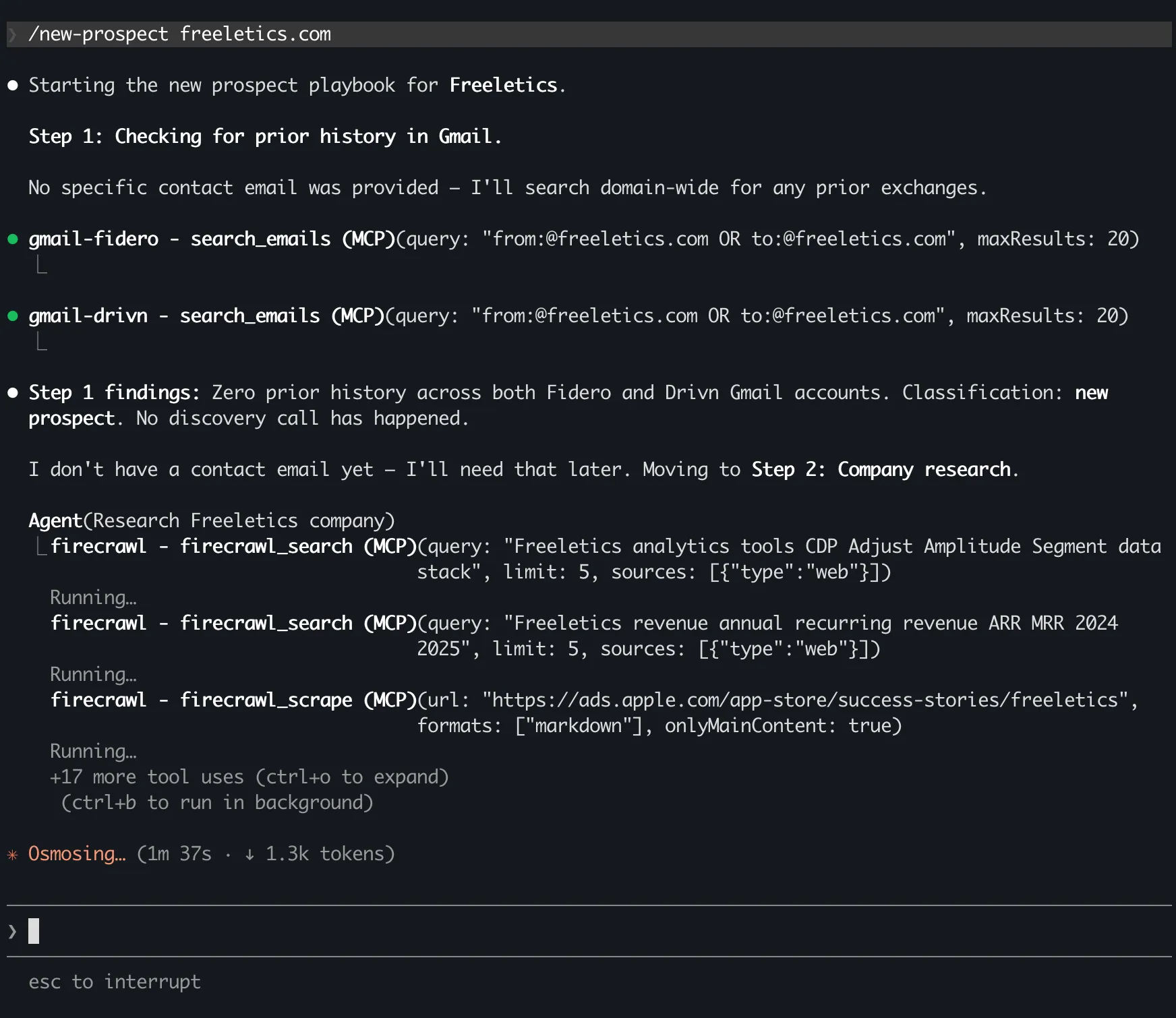
Each step draws from documents that have been refined over months – our qualification criteria, our account strategy template, our discovery frameworks. The command doesn’t just ‘do a task’. It runs our playbook.
Could I do each of those steps individually in Cowork? Yes. Could I build a Cowork skill that does one of them? Probably. But I can’t build a single command that carries our business context through every step, delegates research to a custom agent and writes output back into the project – all wired together, all improving every time the instructions are refined.
That’s what the higher steps need. Not features. Not the terminal. Whether the pieces connect or stay separate.
The team dimension
Cowork is designed around the individual todo list. You open it, work through tasks, close it. That’s the default flow, whether you’re solo or on a team.
Claude Code was built for developers – people used to projects where the setup itself is a shared asset, version controlled, reviewed and inherited on day one. That same discipline is now available for knowledge work.
Your CLAUDE.md captures how you work. Your skills capture your processes. Every correction ripples through every skill and sub-agent that builds on it. The system compounds.
When someone new joins, they start a Claude Code session and immediately inherit everything you’ve built. Your qualification criteria, your discovery framework, your follow-up style – all loaded automatically, from day one.
Cowork stays a personal assistant no matter how many people use it. Claude Code becomes a company operating system, and one person can start building it today.
Past ten agents
Step 3 is where I’m heading: from 5–10 agents to 50–100. It sounds stupid until you notice it’s how human teams already scale. Nobody manages fifty direct reports – you add a layer. One example: a team-lead agent you hand tasks to, which manages a team of Opus agents, and each of those delegates to its own subagents for things like code review. Boris’s name for the role is ‘manager of managers’, and the discipline is the one you’d use with people: delegate outcomes, hold a quality bar and review by exception.
The honest answer
Pick Cowork if what you want is one great assistant. That’s most knowledge workers, and for that job it’s simply the better tool. It also keeps Claude sandboxed from your system, which locked-down corporate environments often require.
Pick Claude Code if you want to go past one agent: parallel work streams, shared team conventions, a custom agent persona Cowork’s fixed prompt won’t let you build – and more steps above when you want them.
If you want Claude Code as infrastructure rather than an assistant, the thing usually in the way is the terminal. You don’t need to learn it – the whole setup is three pasted commands.
Full setup guide: Claude Code for founders who hate the terminal
The coding-specific version: The memory bank framework